 News / How to/Guides
How To: Add Calorie Information to Food Labels & Ticketing
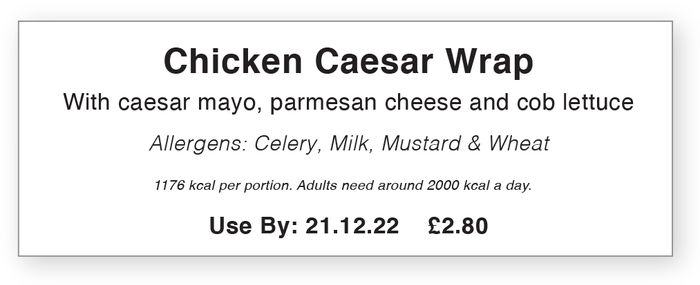
Below you'll find a quick guide to updating your labelling in line with the new Out of Home Calorie Labelling Regulations using our LabelLogic Live software. This offers a calorie feature that allows you to calculate and display the calorie content of your products as text only - see example below - we also offer two Reference Intake-style calorie box options.
Calorie Labelling in 5 Easy Steps
- Open LabelLogic Live’s Template Designer tab
- Go to the ‘Recipes and Nutritional Fields’ drop down menu
- Click the ‘+’ symbol next to ‘Calorie Information’
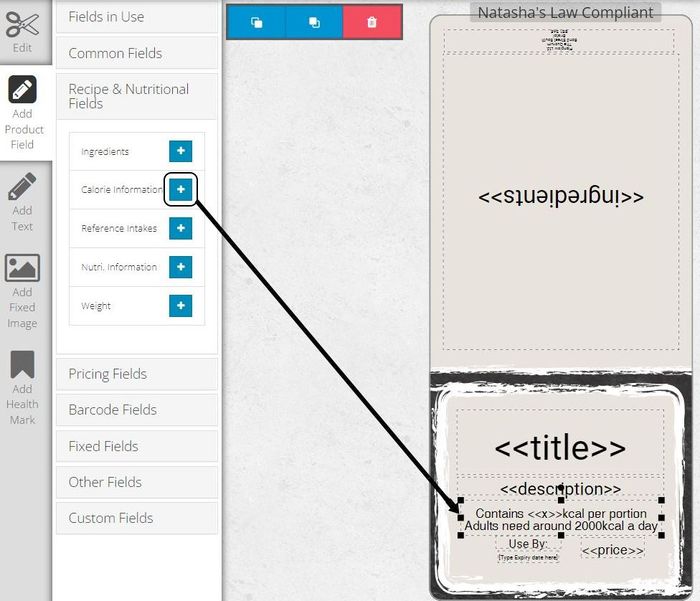
4. Position the calorie box or boxes wherever you’d like them to appear on your labels
5. Print...And just like that you’re good to-go, our labelling software does the rest.

You may also like our blog post 'Counting the Calories: The New Calorie Labelling Regulations Explained'