Video Tutorials
From editing a print list to a masterclass in creating Natasha's Law compliant labelling, our video tutorials are simple to follow, free to watch, and here any time you need them.
From editing a print list to a masterclass in creating Natasha's Law compliant labelling, our video tutorials are simple to follow, free to watch, and here any time you need them.
Learn how to get started with LabelLogic Live. This step-by-step tutorial covers creating product categories, adding products, and printing labels efficiently.

Discover how to use pre-made Print Lists or create your own in LabelLogic Live. Includes tips on adding print-time overrides to lists.
Master advanced actions in the Print Centre, including adding, editing, and deleting items.
Learn how to use the AutoAllergens feature in LabelLogic Live to automatically detect and highlight allergens on your product labels.

Step-by-step guide to managing users in LabelLogic Live, including setting permissions and creating or editing user accounts.

Generate accurate product labels with nutritional information using LabelLogic Live. Ideal for food manufacturers and compliance purposes.

Learn to design custom label templates in LabelLogic Live using the Template Designer for a professional look.

Enhance your labels with customisable templates in LabelLogic Live, ensuring unique branding and professional presentation.
Explore the key settings in LabelLogic Live, including printer adjustments, additional allergens, and site preferences for optimal label printing.
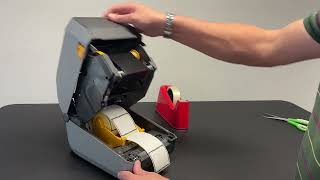
Learn how to connect your Zebra roll printer to LabelLogic Live, and perform initial setup for label printing.
Learn how to safely remove a used ribbon and install a new one, ensuring proper routing and tension for high-quality printing.
Step-by-step guide on how to attach an external roll holder, necessary for handling larger label media.
Learn how to remove old label stock and load new media in Citizen printers for consistent and accurate label printing.
Understand how to align the media sensor on a Citizen printer to match your label type, ensuring correct detection of gaps or black marks.
Learn how to perform an automatic sensor calibration on your Citizen printer for accurate label detection and consistent print results.
Step-by-step guide to setting up your Citizen printer on Microsoft Windows with the correct drivers for seamless printing.
Learn how to set the media sensor for reflective (black mark) label media, and perform an automatic sensor calibration for precise printing.
Step-by-step guide to configuring the media sensor for transmissive (gap) label media, and performing automatic sensor calibration for consistent print quality.
Learn how to safely remove a used ribbon and install a new one, ensuring proper ribbon routing and tension for high-quality prints.
Step-by-step tutorial to remove old label stock and load new media while correctly lowering the print head to prevent damage.
Understand how to align the media sensor to match label types, ensuring accurate gap and black mark detection and preventing misaligned prints.
Learn how to safely remove a used ribbon and install a new one, ensuring correct ribbon routing and tension for optimal print quality.
Step-by-step guide to remove old label stock and load new media into your Tec B-SA4T printer, including proper positioning of the sensor bar.
Learn how to align the media sensor to match label types, ensuring accurate gap or mark detection and preventing misprints.
Step-by-step tutorial on performing manual sensor calibration on your Tec B-SA4T printer for precise label detection, and accurate printing.